
📈 Millarum Created vs Resolved
Dual-line chart showing issue creation vs. resolution trends over a configurable time window.
Overview
Use this widget to answer:
- Is the team resolving issues faster than they are being created?
- Is the backlog growing or shrinking over time?
- Are there recurring spikes of new work being created?
- When did the team achieve net-zero (resolved ≥ created)?
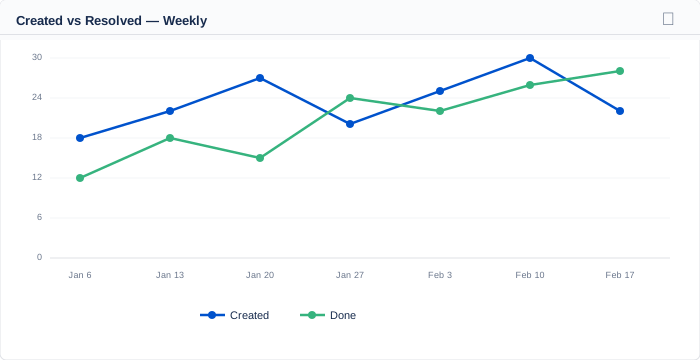
Weekly Created vs Done line chart — green tracking at or above blue indicates a healthy backlog
Adding the Widget
- Click Add gadget on your dashboard.
- Search for "Millarum Created vs Resolved".
- Click Add.
Configuration
Click the ⚙ Configure icon to open the configuration panel.
Grouping
Controls the time bucket size for the X-axis:
| Option | Description |
|---|---|
| Daily | One data point per day — most granular; best for short windows (1–30 days) |
| Weekly (default) | One data point per 7-day period — balanced view for most teams |
| Monthly | One data point per calendar month — high-level trend view for longer windows |
Graph Type
| Option | Best For |
|---|---|
| Count (default) | Identifying specific weeks or months with high activity; spotting spikes |
| Cumulative | Revealing whether the backlog is growing or shrinking over the entire period |
In Cumulative mode, if the Created line is always above the Done line, your backlog is growing. When the lines converge or Done overtakes Created, the backlog is shrinking.
Days History
The number of calendar days to look back from today. Range: 1 – 3,650 days (up to 10 years). Default: 300 days.
Reading the Chart
The chart displays two lines:
| Line | Color | Meaning |
|---|---|---|
| Created | Blue | Issues whose creation date falls within this time period |
| Done | Green | Issues moved to a "Done" category status in this time bucket |
Healthy signal: the green (Done) line consistently tracks at or above the blue (Created) line.
Growing backlog: the blue line rises above green over multiple buckets.
Drilldowns
Click any data point on either line to open a Jira issue search showing the exact issues for that point:
- Clicking a Created data point opens issues created in that time bucket.
- Clicking a Done data point opens issues resolved in that bucket.
- In Cumulative mode, clicking shows all issues from the window start up to and including that bucket.
Empty States
| Message | Cause |
|---|---|
| Please add the Millarum Slicer to this dashboard | No Slicer on the same dashboard |
| No data for current filters and date range | No issues match in the configured window |
| Loading… | Data is being fetched |
Tips
- Use Cumulative + Monthly for executive-level or quarterly health reports.
- Use Daily + Count to investigate a specific incident or crunch period in detail.
- Extend Days History to 365+ to spot seasonal patterns in work volume.
- Combine with the Slicer's Issue Type filter to compare Bug vs. Story creation rates on separate chart instances.
- A persistent gap where Created > Done is a reliable indicator that the team needs more capacity or scope reduction.